
Rocket League
Activation instructions:
- On TWITCH.TV log out of your account and log in to your purchased twitch account.
- If twitch asks you for a code from your email, then press "Remind later", "X" or F5 on your keyboard.
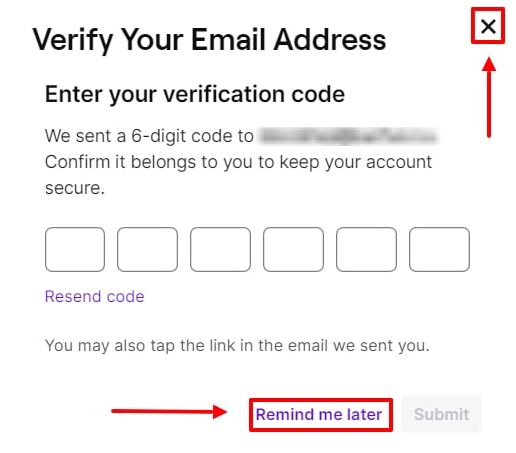
- An error occurred when logging into the twitch account. Try again and change the browser. If it doesn't help, try the built-in browser or VPN (in extreme cases).
- Follow the link www.epicgames.com/account/connections, log in to your gaming account, then connect the purchased twitch (If another twitch has already been linked, then first untie it).
- Log in to the game again in about 5 minutes. If you have purchased RLCS, they will be in the rewards section of your inventory. Other paint drops, explosions, etc. will be in the corresponding inventory sections.
- IMPORTANT - do not disconnect your Twitch account from the game until you receive items in the game!
Important information
Absolutely all products are safe to use and NO ingame sanctions can be imposed on your account for them, it's just a twitch linking.
All products are up-to-date, correct availability is indicated everywhere. There are no restrictions on the region, you can activate from anywhere in the world.
Accounts are issued in 1 hand, they are all different and do not repeat. Once purchased, the Twitch account is yours forever.
Please read the product description, most of the answers to your questions are there. If you wanna buy a product - just pay for it, the bot will give you everything automatically(account+activation instructions).
To contact the seller, first ask your question (it should NOT be related to a question that already has an answer in the description, read CAREFULLY, please! Do not call me before writing a question, dont waste your and my time). The command to call is "!support", written SEPARATELY from your question.
Twitch account have to be linked through the browser(full) version of twitch. If you are linking via phone, you may encounter problems due to the downloaded application, interface bugs, etc. I strongly recommend using a PC.
If you try to cheat the seller / negative feedback due to your carelessness or other factors / lies for personal gain, you will be added to the Black List, and all items that you manage to get from your TWITCH account will be waived by the twitch support. Think twice before trying to cash in or ruin a seller's rating.
If you have any problems, call the seller and wait, no need to run headlong to write a review or support. In 99% of cases, the problem is due to inattention when reading the instructions or description, please read everything before buying and after it, if there are any questions.